Last update: 19 August 2026
Thunderbird 115 (Supernova) replaced the familiar unread messages counter in the folder pane with a coloured badge. If you liked the old Inbox (3) look better, here is how to bring it back — these days with a one-click add-on instead of hand-edited CSS.
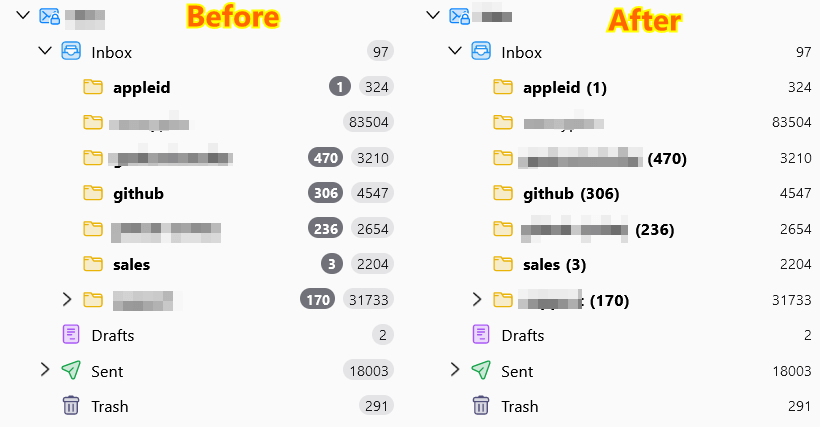
Before and after the fix
Install the Classic Folder Counts add-on
The fix now comes as a small Thunderbird add-on, so there is nothing to edit by hand:
- Download the
.xpifile from the releases page. - In Thunderbird open Add-ons and Themes, click the gear icon, choose Install Add-on From File… and pick the downloaded file.
The counters change immediately — no restart. No about:config change is needed either: Thunderbird installs the add-on as is. It works in every version starting from 115 (Supernova).
What you can configure
The add-on options have two checkboxes:
- unread count in parentheses instead of the badge;
- total message count as plain right-aligned text — visible only if you turned total counts on in the folder pane menu.
Both apply instantly, and one click in the Add-ons Manager switches everything off again.
The source code is on GitHub. There is no magic inside: it is the same style sheet as below, registered the same way Thunderbird registers userChrome.css, and removed again when you disable the add-on.
Why an add-on rather than userChrome.css
- no toolkit.legacyUserProfileCustomizations.stylesheets flag and no hunting for the profile folder;
- changes apply without restarting Thunderbird;
- turning it off is one click instead of editing a file;
- it keeps up with Thunderbird, while a hand-copied snippet quietly rots — the CSS below has already drifted twice, see the note at the end.
The old userChrome.css method
Outdated, but it still works. Use it if you would rather not install anything.
1. Enable userChrome.css support in Thunderbird. By default userChrome.css usage is disabled in Thunderbird. To enable it you need to set toolkit.legacyUserProfileCustomizations.stylesheets to true in the Config Editor.
2. Put this CSS code to chrome/userChrome.css in your profile folder:
/* This code reverts Mozilla Thunderbird unread badges to numbers in parentheses like it was before SuperNova 115 */

.name {
  flex: inherit !important;
  margin-right: 4px !important;
}

.folder-count-badge.unread-count {
  color: inherit !important;
  font-size: inherit !important;
  padding: 0 !important;
  min-width: 0 !important;
}

.folder-count-badge.unread-count:before {
    content: '(';
}

.folder-count-badge.unread-count:after {
    content: ')';
}

.unread > .container > .unread-count
{
  background-color: inherit !important;
}

/* total */

.folder-count-badge.total-count {
  flex: 1;
  text-align: right !important;
  background-color: inherit !important;
  padding: 0 !important;
  margin-inline-end: 0 !important;
}
3. Restart Thunderbird.
Two details of this snippet drifted in Thunderbird 148 and newer, and both are worth adding to the .folder-count-badge.unread-count rule:
min-widthin Thunderbird’s own badge rules becamemin-inline-size, somin-width: 0no longer shrinks the counter — addmin-inline-size: 0 !important;- a collapsed folder whose subfolders have unread messages keeps a thin oval outline around the number, because nothing resets the border — add
border: none !important;
The add-on already handles both.